

Platform Type
Open-source eCommerce plugin for WordPress

Open-source eCommerce plugin for WordPress
WooCommerce REST API and webhooks (no EDI)
Orders, order status, shipments, stock levels, prices
Self-hosted or managed WordPress hosting, one or several stores
ERP and Warehouse
WooCommerce is a free, open-source eCommerce plugin that turns a WordPress site into an online store. Merchants host the store themselves or with a hosting provider, own their customer and order data, and extend the shop with plugins for payments, shipping and B2B pricing.
That flexibility means no two WooCommerce stores are set up the same way. Custom order statuses, extra checkout fields and third-party plugins all affect how orders reach your ERP. A reliable integration maps your store’s actual setup, not a generic template.
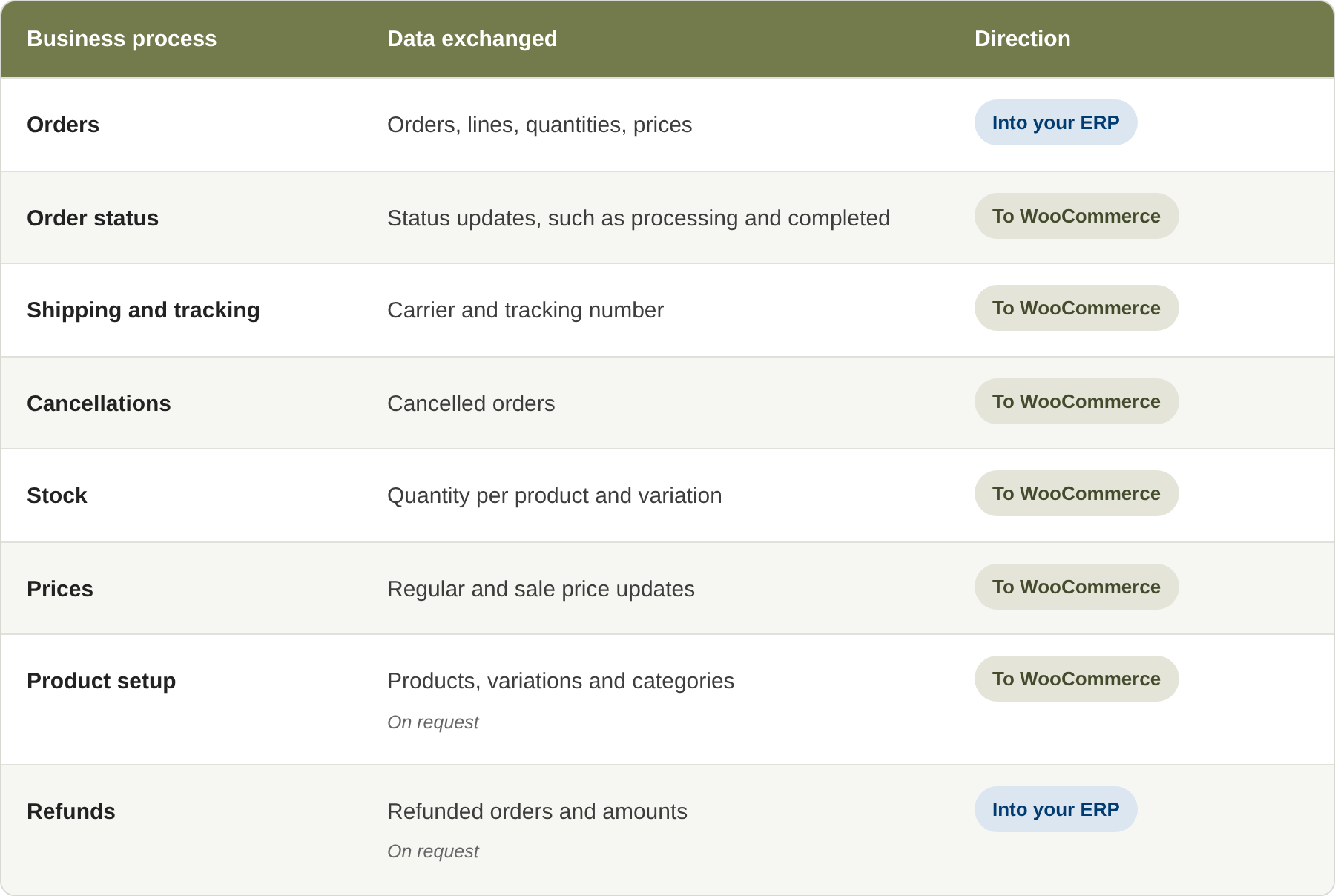
Orders move from WooCommerce into your ERP, and order status, tracking, stock and prices move back.
A customer places an order in your WooCommerce store.
HubBroker receives the new order through a WooCommerce webhook or retrieves it through the REST API.
The sales order is created in your ERP or sent to your warehouse.
When the order ships, HubBroker updates the order status in WooCommerce and adds the tracking details.
WooCommerce merchants whose order volume has outgrown manual entry.
Multichannel brands selling the same SKUs on WooCommerce, Amazon and other marketplaces.
B2B wholesalers using WooCommerce as an ordering portal for trade customers.
Businesses running several WooCommerce stores for different countries or brands that want all sales in one ERP.
HubBroker connects WooCommerce to the ERP you already use, including Microsoft Dynamics 365 Business Central, Microsoft Dynamics 365 Finance & Operations, e-conomic and Uniconta. Each connection is configured for your item structure, warehouses, payment methods and shipping methods.
No re-keying: Web orders reach your ERP automatically, including outside office hours.
Accurate stock: Stock levels from your ERP keep your webshop aligned with what you can ship, including product variations.
Informed customers: Order status and tracking are updated in WooCommerce as soon as the order ships.
One ERP for every channel: WooCommerce orders sit alongside your marketplace and B2B orders, so finance and fulfilment work from one set of records.
Visible exceptions: Rejected API calls, unknown SKUs or missing data are flagged for action.
WooCommerce store: A WordPress site running WooCommerce with the REST API available over HTTPS.
API access: A REST API key created in WooCommerce under Settings > Advanced > REST API, with the permissions the integration needs.
Hosting: Your hosting, firewall or security plugins must allow API requests and webhook delivery between WooCommerce and HubBroker.
ERP access: Your ERP’s connector or API.
Data mapping: WooCommerce SKUs and variations mapped to ERP items, payment and shipping methods to ERP codes, and order statuses to your ERP processes.
HubBroker connects WooCommerce to your ERP through HubBroker iPaaS. We configure the API connection, map products, variations, payment and shipping methods, and automate order import, status and tracking updates, stock and prices.
Every transaction is validated and logged, and e-mail notifications flag exceptions before they reach your customers. When WooCommerce or your store plugins change, mappings are adjusted accordingly.

No. WooCommerce stores integrate through the WooCommerce REST API. EDI is only relevant if you also trade with retailers or distributors that require it, which is a separate integration.
No. HubBroker uses the standard WooCommerce REST API. If you use a shipment tracking extension, tracking numbers are written to it.
Yes. Stock is published for each variation, such as size or colour, mapped to the matching ERP item.
A REST API key you generate in your WooCommerce admin, limited to the permissions the integration needs. You can revoke it at any time.
Yes. Each store uses its own API key, and all orders are created in the same ERP.
Yes. Orders are created in Business Central, and order status, tracking, stock and prices are returned to WooCommerce.
45B 1260 Bredgade , København K Capital Region, Denmark
D-1010, The First, B/H ITC Narmada, Ahmedabad, Gujarat, 380015, India


