
How to Integrate with Amazon Vendor or Seller Central via EDI or API
Every Amazon order your team rekeys into the ERP is a chance for a wrong quantity, a late shipment notice or a missed stock update.
For vendors, those errors come back as chargebacks and deductions on the remittance. For sellers, they show up as oversold listings, late shipments and account health warnings.
The answer is an automated connection between Amazon and your ERP. Amazon offers two routes, EDI and API, and the right one depends on how you sell. This guide explains the difference, walks through the project step by step, and shows how to connect Amazon without replacing the systems you already run.
Vendor Central vs Seller Central: two different integration models
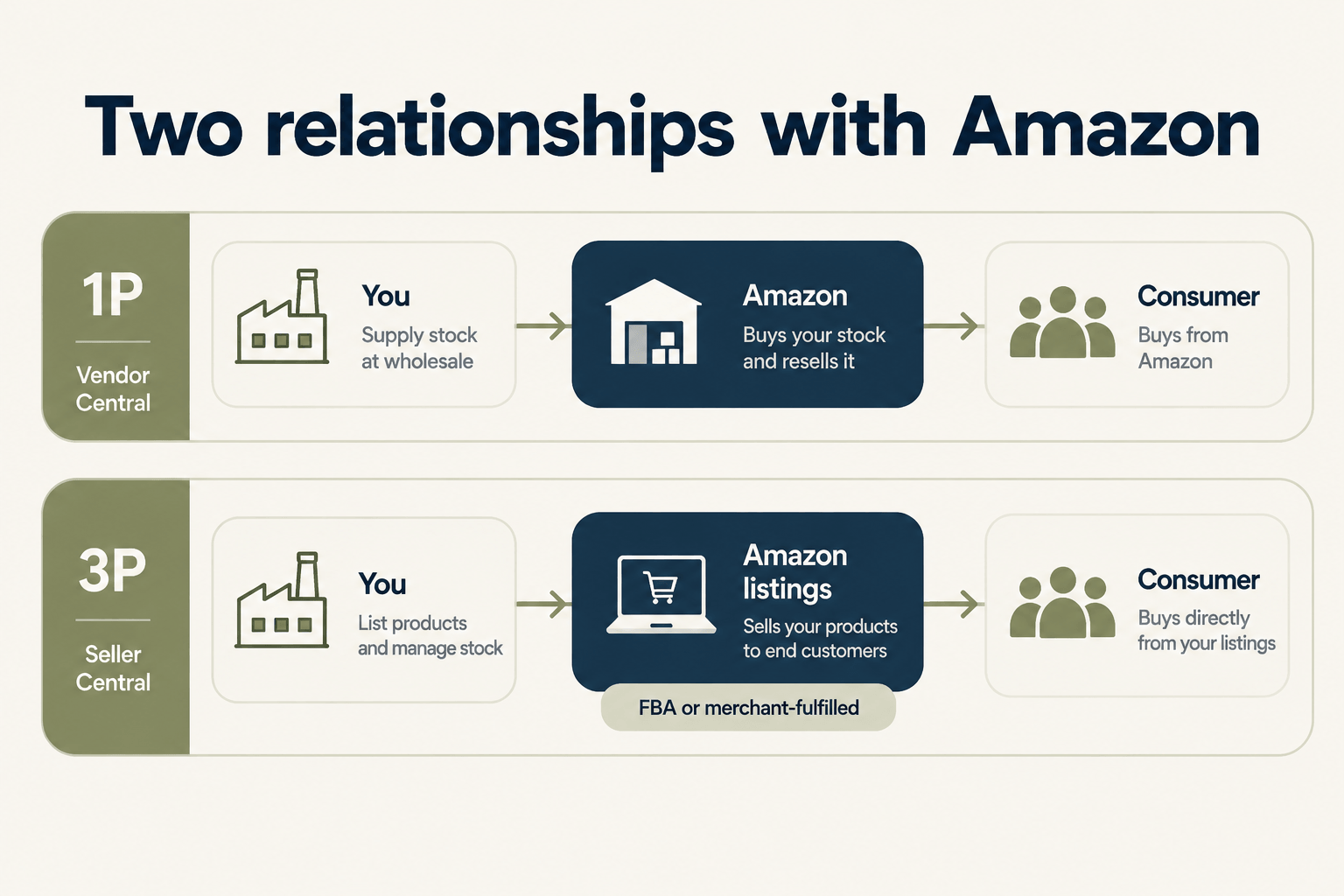
Before you choose a technology, confirm which Amazon relationship you have. The two programmes work differently, and so do their integrations.
Vendor Central (1P): Amazon is your customer
In Vendor Central, Amazon buys stock from you at wholesale and resells it. Amazon sends purchase orders, you confirm them, ship to Amazon's fulfilment centres and invoice Amazon.
It is a classic retail supply relationship, built on the same order-to-invoice document flow you would run with any large retailer.
Seller Central (3P): Amazon is your marketplace
In Seller Central, you sell directly to consumers through Amazon listings. You own the stock and set the prices. Orders come from end customers, and either you or Amazon, through Fulfilment by Amazon (FBA), ship them.
Here the integration is about orders, stock levels, listings, shipment confirmations and settlements, not purchase orders and invoices to Amazon.
Many brands run both programmes. If you are on the vendor side, our breakdown of Amazon EDI requirements vendors get wrong covers the most common compliance gaps.
EDI or API: which route fits your Amazon account?
Amazon supports both EDI and its Selling Partner API (SP-API). The programme you sell through narrows the choice.
EDI for Vendor Central: message types and AS2 connectivity
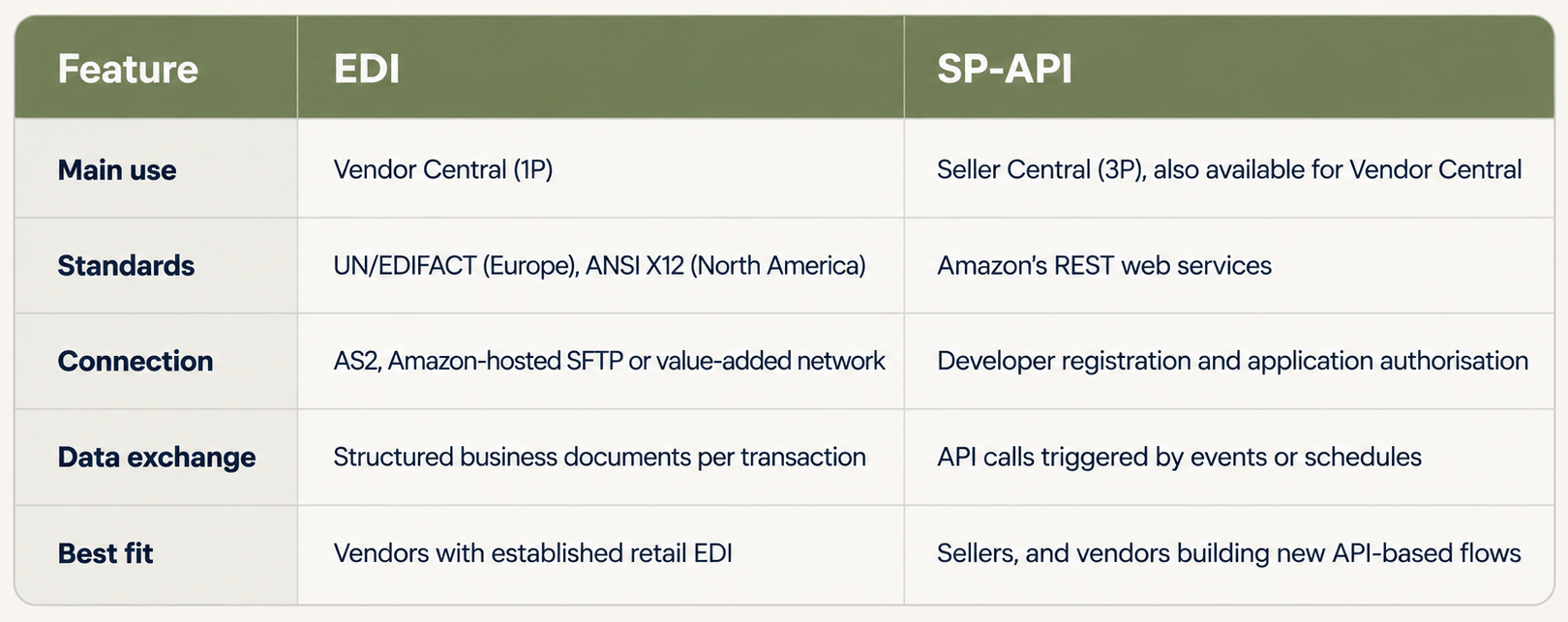
Vendor Central supports traditional EDI. European marketplaces typically use UN/EDIFACT, while North America uses ANSI X12.
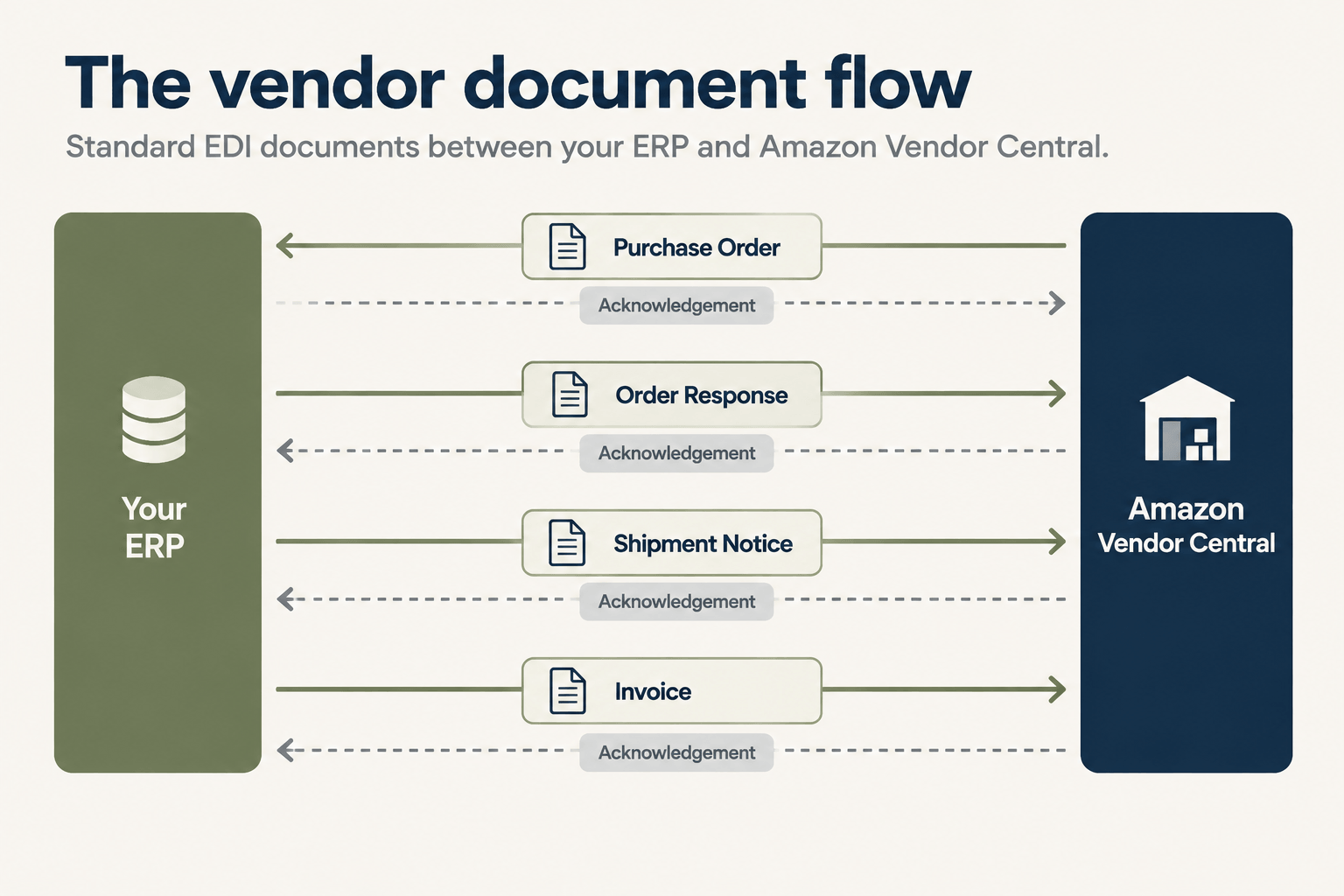
A standard vendor flow covers purchase orders, order responses, shipment notices (despatch advice) and invoices, plus functional acknowledgements for each document. Connection options in Vendor Central's EDI self-service setup include AS2, Amazon-hosted SFTP and value-added networks.
Which messages apply to you is defined by your vendor agreement and Amazon's regional specification. Scope from those documents, not from a generic list.
SP-API for Seller Central and Vendor Central
SP-API is Amazon's web service interface. For sellers, it is the standard route to orders, stock, listings, fulfilment, reports and finance data.
Vendors can use it too. Amazon's vendor APIs cover purchase order management, order acknowledgements, shipment confirmations, invoice submission and transaction status checks.
Access starts with registering as an SP-API developer. Private applications are self-authorised by your own organisation, while public applications are authorised by sellers or vendors through OAuth. For private seller applications, Amazon requires a professional selling account.
EDI vs API at a glance
How to integrate via EDI or API with Amazon, step by step
The technical route differs, but the project follows the same six steps. Direction is shown from the ERP's point of view: inbound means into your ERP, outbound means from your ERP to Amazon.
Step 1: Confirm your account type and marketplaces
Establish whether you are a vendor, a seller or both, and which Amazon marketplaces you sell in. Confirm your fulfilment model: FBA, merchant-fulfilled, or direct fulfilment for vendors. These answers set the scope of everything that follows.
Step 2: Map your inbound and outbound document flows
List every flow and its direction. For vendors, purchase orders are inbound, while order responses, shipment notices and invoices are outbound. For sellers, orders, returns and settlements are inbound, while stock levels, shipment confirmations and tracking are outbound.
Decide which system is the source of truth for each record.
Step 3: Set up connectivity
For EDI, complete the EDI self-service setup in Vendor Central, choose your connection method and set up test and production endpoints. For SP-API, register as a developer, create the application and authorise it for your account.
Store credentials in a managed, access-controlled location. Never share them by e-mail or keep them in documents.
Step 4: Map Amazon data to your ERP
Most integration errors start here. Match Amazon identifiers such as ASINs, EANs and seller SKUs to your ERP item numbers. Align units of measure, prices, tax codes and warehouse locations.
Step 5: Test with Amazon and get approval
Vendors test each EDI message with Amazon before production. [TO CONFIRM: current Vendor Central test and approval process] SP-API integrations should be tested against Amazon's sandbox and with controlled live orders.
Test failure scenarios as well as successful ones: rejected documents, missing fields and out-of-stock items.
Step 6: Go live and monitor exceptions
Once in production, watch acknowledgements, rejected messages and API errors daily. Set alerts so your team fixes a failed document before it becomes a missed delivery window.
Common pitfalls that cost vendors and sellers money
Most Amazon integration problems appear after go-live, not during testing.
Shipment notices that don't match the shipment. If carton contents or quantities in the notice differ from what arrives at the fulfilment centre, receiving flags it and the cost lands on you.
Invoices that don't reconcile to the purchase order. Unit of measure, price and item identifier mismatches are the usual causes.
Unread acknowledgements. A rejected document that nobody sees becomes a missed order.
Slow stock updates. For sellers, a delay between an ERP stock change and the Amazon listing leads to oversold units.
Mixed fulfilment flows. FBA orders routed to your own warehouse create duplicate picking.
Uncontrolled buyer data. Merchant-fulfilled orders contain customer names and addresses. Amazon's Data Protection Policy sets rules for how that data is handled, and your integration should keep it only where your processes need it.
Why an integration layer beats point-to-point builds
A custom script between Amazon and one ERP works until Amazon changes an API version, your ERP is upgraded or you add a second marketplace. Each change becomes a new development project.
An integration layer keeps mapping, validation and monitoring in one place. Your ERP stays the source of truth, and new channels are added without rebuilding the connections you already have.
Amazon EDI and API Integration Solution Through HubBroker
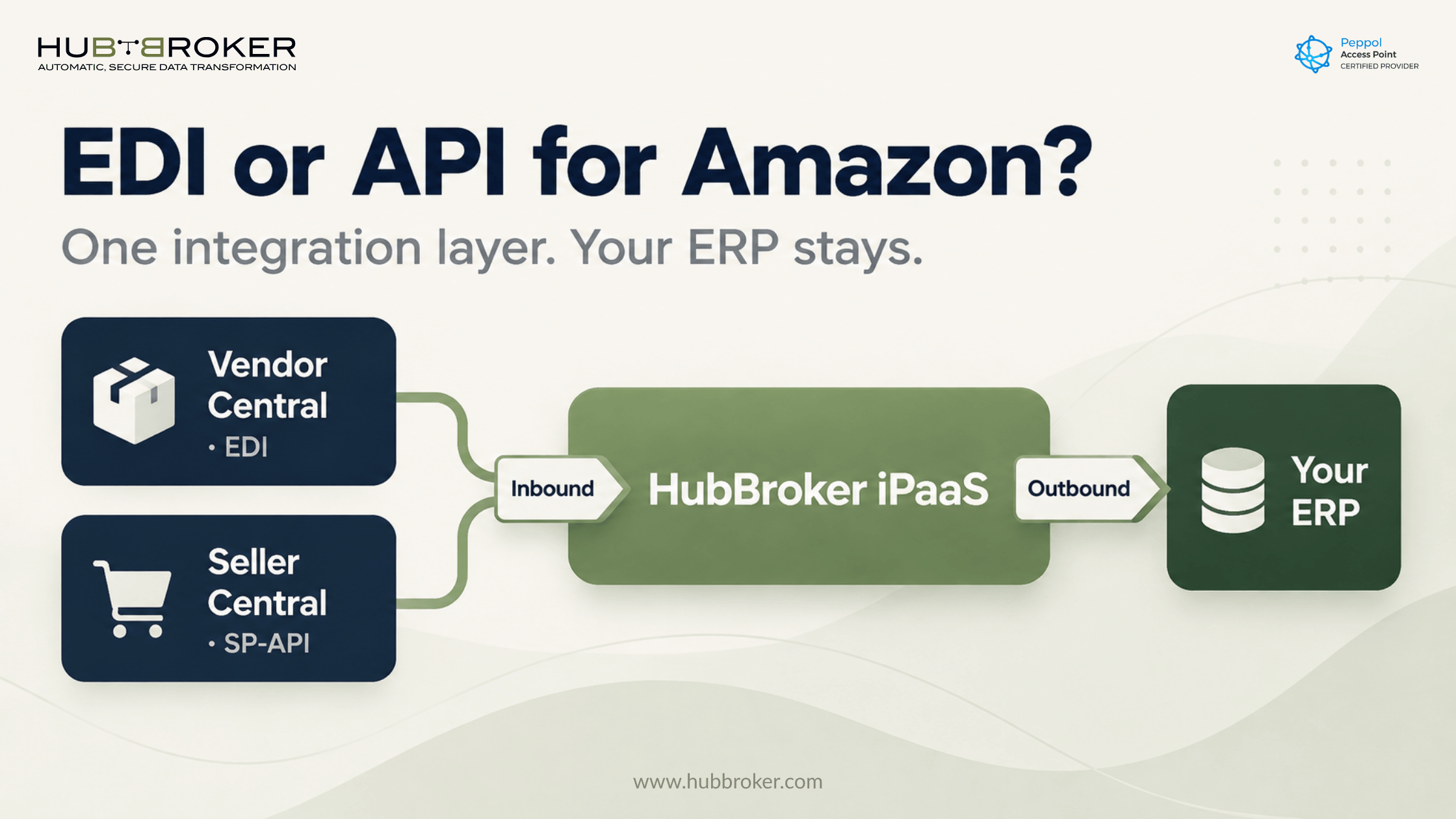
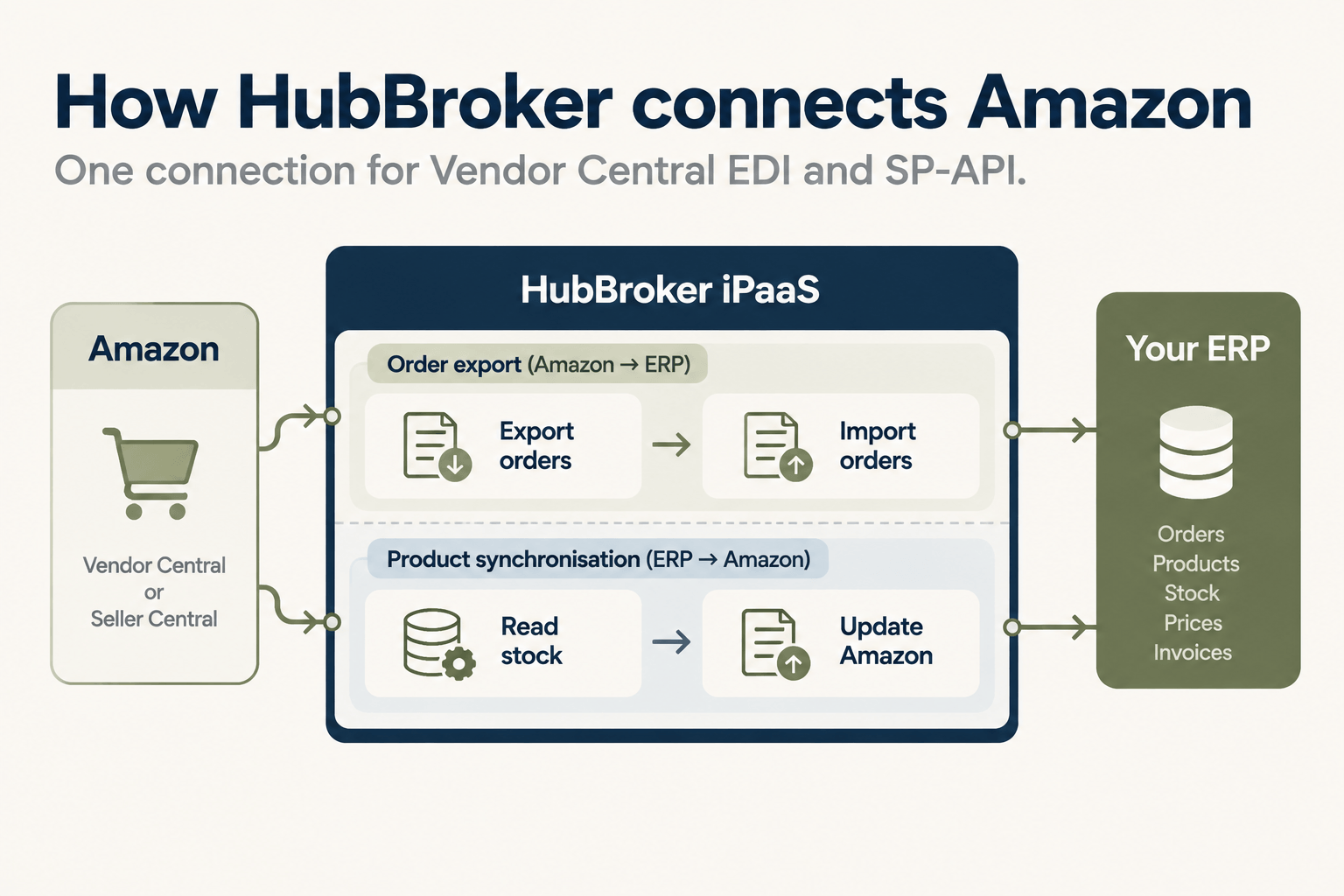
HubBroker iPaaS sits between Amazon and your ERP and handles the connection, mapping and monitoring for you. Your existing ERP stays as it is.
One connection for Vendor Central EDI and SP-API
HubBroker connects your Amazon account through SP-API or supported EDI flows, giving automated access to orders, stock, fulfilment and marketplace data. [TO CONFIRM: which Vendor Central EDI messages are supported in production]
Two adaptors do the core work. Order export is inbound: HubBroker exports your Amazon orders and imports them into your ERP through a connector or API, based on customised rules. Product synchronisation is outbound: HubBroker reads stock and updates your Amazon listings.
See the full scope on our Amazon integration page.
Pre-built connectors for your ERP
HubBroker connects Amazon to Microsoft Dynamics 365 Business Central, Microsoft Dynamics 365 Finance & Operations, Visma e-conomic, Uniconta and Rackbeat.
The same platform runs your wider EDI integration and ERP API integration flows. Using a different ERP? Contact us to discuss your integration.
Monitoring, error handling and exception alerts
Flows run in real time or on a schedule: hourly, daily or weekly. Your team receives positive and negative e-mail notifications, so a failed order or stock update is visible straight away instead of at month-end.
What onboarding looks like
Every Amazon project follows the same path: requirement review, mapping, testing and go-live. Your e-commerce, IT and operations teams see progress at each stage.
Frequently asked questions
Can I use both EDI and API with Amazon? Yes. Many brands run EDI for Vendor Central and SP-API for Seller Central. Vendors can also use Amazon's vendor APIs instead of EDI for core retail flows.
Does Seller Central support EDI? Seller Central integrations are built around SP-API rather than traditional EDI transaction sets. If your ERP or partners work in EDI, an integration layer translates between the two.
How long does an Amazon Vendor Central EDI setup take? It depends on the number of messages, marketplaces, your ERP setup and Amazon's test cycle. Contact us for an estimate based on your flows.
Do I need to change my ERP to integrate with Amazon? No. An integration layer connects Amazon to the ERP you already use, and the ERP remains your source of truth.
What happens if my shipment notices are late or incorrect? For vendors, Amazon can apply chargebacks under its vendor operational requirements. The exact rules are in your vendor agreement and Vendor Central. Validating each notice before it is sent reduces the risk.
Planning an Amazon integration, or fixing one that keeps generating deductions? Contact us to walk through your current flow and ERP setup.
